Posted on 8 Comments

iPad Painting and the Wacom Bamboo Stylus

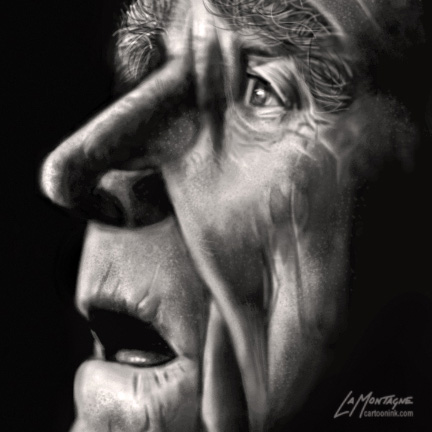
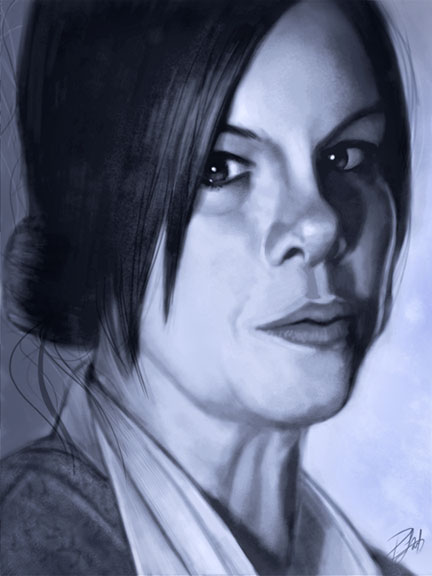
Here’s another iPad painting that I just finished.  This is Marcia Gay Harden in character as ‘Mother Carmody’ from the Frank Darabont movie, ‘The Mist,’ based on the novel by Stephen King.  She is one of my favorite movie villains which made this a lot of fun to work on.  Frank Darabont is one of my favorite filmmakers and Stephen King is my favorite author, so it should come as no surprise that The Mist is one of my favorite movies.  How many times can you use ‘favorite’ in a sentence?

Darabont has made movies out of a number of King’s books.  In addition to The Mist, there was The Green Mile and The Shawshank Redemption.  He is also responsible for the breakout miniseries ‘The Walking Dead,’ which is one of the few television shows I would pay extra to see.  And if that weren’t enough, Darabont has used Drew Struzan (one more favorite) to create the posters for a number of his movies, including the ones I’ve mentioned here.  It’s no wonder I’ve chosen two of his characters to paint on the iPad.

I’ve already written a great deal about the process for painting on the iPad and the ArtStudio app, which is still preferred over all others.  If you’d like to see other iPad paintings and posts, there are links at the end of this entry.  The process is very much like other digital painting, with some limitations due to the nature of the iPad.

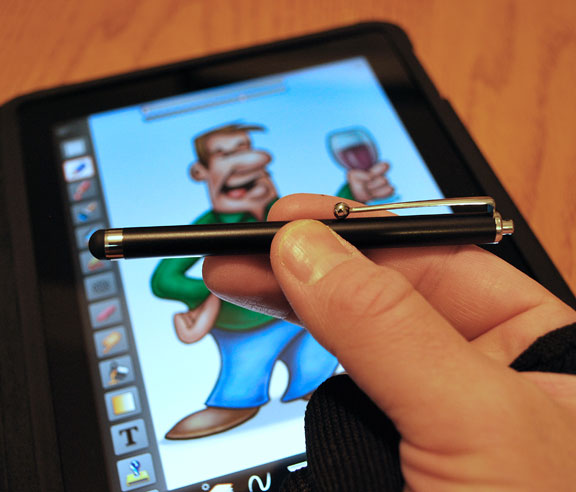
What made this current painting different is that I was taking a new stylus for a test drive.  Up until now, I had been using (and recommending) the Targus stylus, but I recently got my hands on the new Bamboo Stylus for iPad by none other than Wacom.  I’ll be honest, I had REALLY high expectations for this stylus.  Wacom has long been established as the go-to company for drawing tablets, and having owned more than a few of them, I’m a pretty big fan.  I couldn’t do my work without a Wacom tablet.

I already knew that the stylus wasn’t going to be reinventing the wheel.  Anybody expecting pressure sensitivity (something Wacom tablets are very well known for) should dismiss it now, no matter what stylus you’re using.   The iPad currently does not support pressure sensitivity, so that discussion ends pretty darn quick.

Without going into great boring technical details, I can sum up the Wacom Bamboo Stylus pretty easily.  It is the best stylus I’ve used so far.  Every other stylus I’ve tried, and there have been four of them, has been a little like drawing with a piece of chalk.  A large surface area with the tip, because the iPad is built to register a finger, not a pen.   What it looks like Wacom did, however, was take that tip size to the ultimate minimum.  The contact surface is significantly smaller than any other stylus I’ve seen so far.  It’s still not fine point tip, but it’s a definite improvement over all others I’ve tried.

What else did they get right?  Well, it’s longer than any other stylus I’ve used, so it feels better in my hand.  It has better balance, too.  They included a clip (something others have failed to do) and it looks good, too.  While I’m sure a lot of work went into the research and development of this stylus, it’s not a complicated device.  It’s a pen that allows you to write, draw, and paint on the iPad.

Many people will recall that I liked the Targus stylus, and up until now, it was all I needed.  Wacom, however, raised the bar with the Bamboo Stylus and it’s now my primary drawing device for the iPad.  I still have to use the glove so I can rest my hand while drawing without activating the app with the heel of my hand, but that’s a compensation for the iPad, not the stylus.

As with all of the stylus products out there, there are metal parts on them, so a little bit of care for your iPad is warranted.  Don’t leave your stylus sitting on the screen or push really hard at a very steep angle as there is always the risk of slipping and possibly scratching the iPad.  You don’t need to push hard with ANY stylus, and if you use the Bamboo Stylus properly, you should have no issues.

I do not have a screen protector on my iPad, so I can’t say how it works with one, but I used my iPad a LOT, do a lot of painting with it, and the only scratches I’ve ever got were from a brief test of the Dagi stylus which put three nice little scars on the screen.  Even those are hard to find, but it was enough for me to abandon it.  The Apple case is all I’ve ever needed for the iPad, so I don’t see the need for a screen protector.

Bottom line, I would highly recommend buying the Wacom Bamboo Stylus.  Yes, at $29.95, it costs a little more than others on the market, but I’ve always believed that you get what you pay for, and this one is worth it.  It’s a joy to paint with and after the first few minutes, I didn’t think about the pen at all, which is the best endorsement I can offer.  I find the best products (hardware and software) are the ones that allow you to think about your work, not the tools you use to create it.

As for those who are demanding pressure sensitivity, talk to Apple about it.  In the meantime, you can easily fake pressure sensitivity with most apps on the market by varying the opacity of the brush in the app itself.  That’s what I did throughout this whole painting and it worked very well.  I rarely use full brush opacity when painting, even in Photoshop.
One final note about painting with the iPad in general…

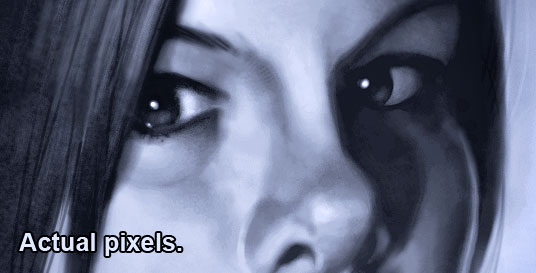
The iPad has limitations that prevent me from producing ready-for-market paintings.  Just the color calibration and resolution limitations are enough to put the brakes on creating finished work.  This ‘actual pixels’ image is as close as you can zoom in on the first-gen iPad.  Were I to import this into Photoshop, it would serve as a sketch for a painting, with many more hours required to create a finished piece.  Had I painted this in Photoshop, I would consider this to be about half done at this stage.

With that in mind, you might wonder why I bother painting with the iPad at all, when I can get much more detail and a tighter rendering with Photoshop and a traditional Wacom tablet.  The reasons are simple.  With the right app, and the right stylus, the iPad is a great sketchbook.  I also enjoy the challenge of seeing how far I can take a painting, and it’s just great overall painting practice.  Another reason is simply to show that you can create quality artwork on the iPad, despite the critics (fewer all the time) that say it’s of no practical use to artists.  One thing I’ve learned over the years by watching what talented and creative people do with all sorts of mediums in this world is that artists will decide for themselves what is and isn’t of practical use for their own creativity.

If you’d like to see other iPad painting posts I’ve written along and images I’ve painted, here are some links.

iPad Cartooning: An Ongoing Experiment

iPad Painting: Billy Connolly

iPad Painting: James Whitmore

iPad Painting: Daniel Day-Lewis
Posted on Leave a comment

Photo Reference

In a blog entry from November, I wrote about the need for photo reference when it comes to my Totem paintings.  In the interest of keeping this blog entry from becoming lengthy, you can follow this link and read it, if you’d like more information on that.

While I usually get photo reference from photographer friends and colleagues, I’ve recently realized that I need to start developing some photography skills so that I can start gathering my own.  I have a decent digital SLR camera, a Nikon D60, and while it is by no means a professional rig, it’s enough for what I need it for.  The only lens I have is the one it came with, and I’m beginning to see that I’m going to eventually need a zoom lens in order to get the close detail shots, if the photos are going to be of any use to me.  Even in a zoo, the subject of the shot is going to need to be pretty close.

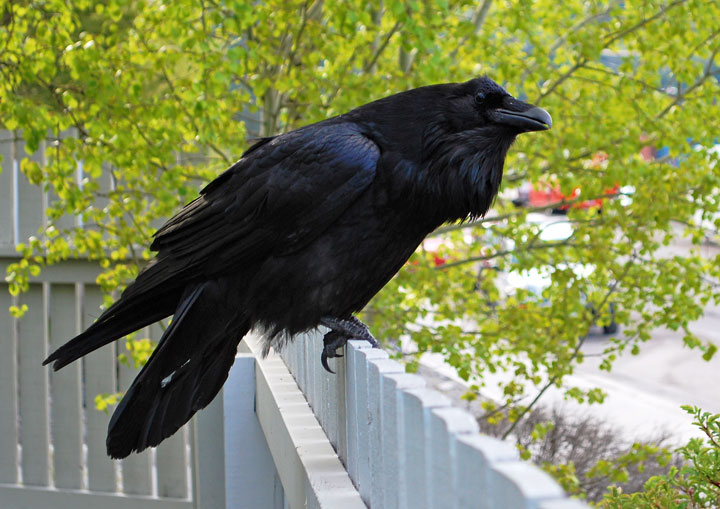
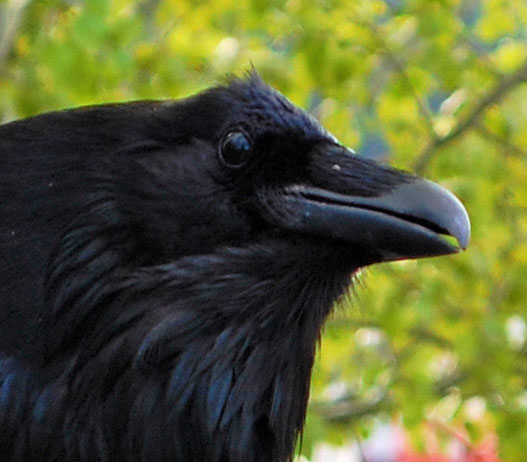
I happened to look out my office window this morning and saw this handsome fellow sitting on the fence making those wonderfully articulate sounds that ravens make.  Even though I’ve already painted a raven, there’s nothing to say I won’t paint another in the future, and you can never have enough reference.  I was able to get a LOT closer than I thought I would.  I would estimate that of the 20 or so shots that I took, the last one was from only about three feet away before he took flight.  He really didn’t seem all that concerned.

Photography is an elusive art form for me, and while I like taking photos, I’ve got enough talented and skilled photographer friends that I know the very large difference between real photography and the point-and-shoot method.  I’ve gotten to a point that I need to do more of the former and less of the latter. Fortunately, I belong to a vast community of talented creatives through the NAPP organization that I can go to for advice and resources.  I also believe that I’ll be taking some more photography classes at Photoshop World this year.

My true love is painting and illustration, so I have no desire to become a professional photographer, and I know that I will still rely on purchasing photo reference from professional wildlife photographers to get the detailed photo reference I need to bring my paintings to life.  I would, however, like to bring my photography up to ‘skilled amateur’ level, in order to make my paintings even better.  I’ve often spoken about the need for artists to continue to grow, and I think this is something that will help me do that.

Posted on 2 Comments

A DVD in the hand

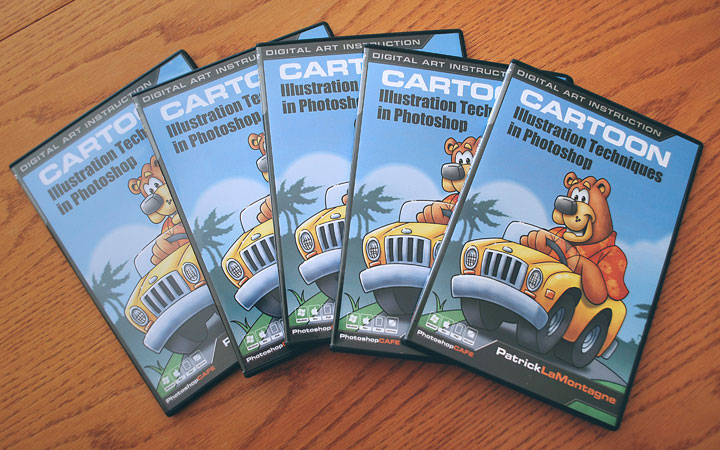
My DVD’s arrived in the mail this week, some of my promotional copies from PhotoshopCAFE.

While it seems like quite awhile ago that I finished the challenging task of recording my first training DVD, it really hasn’t been that long at all.  At the time I was working on this project, it felt like a monstrous undertaking.  In retrospect, I wouldn’t change the experience, because I can now look back on it with a great sense of accomplishment.  Holding the finished product in my hand is made all that much sweeter because of the difficulty and stress I went through recording it.  Many times during the process, I thought to myself, “there is no way I’m going to finish this, and if I do, it’s going to be an incoherent mess.”

I’m now working on my second DVD for PhotoshopCAFE, and while it will still be a challenge,  I find myself without any of the anxiety I felt while working on the first one.  Without challenges forcing you to step out of your routine, there is no growth.  Even though I already knew that, it would appear that I need to be reminded of it once in awhile.  This DVD did just that, and I’m grateful for the lesson.

Posted on 4 Comments

Evolution

As you can see, my new website is up and running.  The site is cleaner, more efficient, easier to maintain and update, and incorporates all of the features I wanted, but could no longer create on my own.  To get the job done, I hired Erik Bernskiold with XLD Studios, and couldn’t be happier with his work.  I’ve included the testimonial I wrote for him at the end of this entry, which pretty much says it all.

If you look around the site, you’ll see that things have changed a fair bit.  Much of this will be self-explanatory, but here are a few details of some significant changes.

Editorial Cartoons

Rather than present them in a gallery format, I’ve used more of a blog post format, showing only the most recent ten cartoons.  Judging from traffic reports on my previous site, I had many regular visitors looking at the current work each day, but few people actually spent a great deal of time going through galleries from years past, so I did away with them, in favor of keeping everything more current.  I’ve turned the comments off on these images, as I would prefer to keep political arguments off this site.  I do post daily editorial cartoons on the Cartoon Ink Facebook page, if you’d like to see them there as well.

Portfolio

I’ve now got three portfolio galleries.  My totem animal paintings in one, paintings of people (caricature and portrait) in another, and commercial illustration work in the third.  I can easily add new images to each gallery as I create them and add more galleries if I find them necessary in the future.

Services

For many years, I was a jack of all trades, accepting almost everything that came through the door, but recently I’ve decided to focus on my strengths.  I’m a cartoonist, cartoon illustrator and digital painter.  That’s what I enjoy and what I’m best at.  For everything else, I have a very large network of incredibly talented friends and colleagues who excel in their creative fields and I’m more than happy to recommend them.  For example, Elizabeth Gast with designbyfirgs.com designed the evolution of my logo you see at the top of the page.

Training

This is a very exciting addition for me as it showcases my first training DVD through PhotoshopCAFE.  I’m working on the next one right now, with plans for more in the future.  Additionally, I have more training opportunities that I’ll be able to talk about soon, as well as others on the horizon.

Shop

As regular followers of my work and ramblings will know, I have a line of limited edition giclée canvas prints for sale at Two Wolves Trading Company in Canmore, Alberta and Editions Gallery in Banff, Alberta.  Those can be purchased and shipped from each of those venues, and I won’t be selling them from this site.  I am, however, offering open edition matted paper prints of the four totem paintings you will see in the Shop, with more to be released this year.  The prints are available in two standard framing sizes, so framing them won’t cost you an arm and a leg.  The Shop operates through PayPal, and I’ll ship any purchases via Canada Post.  Takes a little longer, but then you avoid duty fees if you’re shopping from outside of Canada.

If you do happen to be in the Canmore area, or plan to be in the future, I would ask that you buy them directly through Two Wolves Trading Co. They’re wonderful people there, and they treat me very well.  The prices are the same, and you’ll also get to see the work of other talented artists when you visit them.

The Blog

All of my blog entries from the past few years have been imported from Blogger to WordPress.  Most of the transfer worked well, some of it did not.  I’m still updating categories for the older entries, and some of the links need to be repaired.  Bear with me if you find a broken one, as I am making these fixes here and there when I have spare moments.

It’s going to take me awhile to get used to this site, but I’m very happy with it.  It will allow me to keep moving forward, and is designed so that I can edit and expand it when it becomes necessary.  Some of the best parts of my business, the work that I enjoy most, were not things I’d planned for long term.  I love trying new techniques and believe in being ready for opportunities, so I wanted a website that would be ready to handle things I haven’t even thought of yet.  And if something does come up that I can’t handle on my own, I know who to talk to help me out, which brings me to the testimonial I wrote for Erik Bernskiold at XLD Studios.

Testimonial

After years of creating my own websites for my freelance cartoon illustration business, I had recently realized that my online image wasn’t keeping pace with my recent successes.  As such, it became apparent that I could no longer create my own site with the limited knowledge I had and still put forward the image I wanted to.  I needed a professional designer and found one with XLD Studios.

Erik Bernskiold came highly recommended from a number of colleagues and having seen the work he did for them, I knew he could build the site I needed.  While I fully expected him to have the technical skills necessary to get the job done, I was pleasantly surprised and very impressed with the service and support Erik provided as well.  He listened to what I needed, asked all the right questions, and offered suggestions I hadn’t even thought of to take my site to a higher level than I’d expected.

Having never used WordPress before, I was apprehensive, but Erik assured me it was the best solution for what I wished to accomplish, even going so far as to give me a very detailed walkthrough tutorial via Skype when it was time for me to begin populating my site with images and content.  During that process, he patiently answered all of the questions I had about functionality and addressed each concern quickly and efficiently.

Erik provided a level of service and professionalism that is far too often lacking these days, and I am very pleased with not only the site he built for me, but with how I was treated as a client.  I wouldn’t hesitate to hire Erik again, and would recommend XLD Studios without reservation.

Patrick LaMontagne  Cartoon Ink


Posted on 1 Comment

iPad Painting: Daniel Day-Lewis


Here’s another painting drawn on the iPad for fun and practice. This is Bill ‘The Butcher’ Cutting from the movie ‘Gangs of New York.’ According to the DVD extras, Daniel Day-Lewis was so committed to the role, that he stayed in character while on set, even when the cameras were off. I’ve seen this movie a few times, and for me, the character of The Butcher is the best part of it.

Had a few requests for progress shots from the last iPad painting I did, but since I hadn’t saved any file copies, I kept that in mind while painting this one. Click on any of these images to see them a bit larger, although size is limited by the iPad resolution.

Image 1-3

Image 4-6

Closeup

Now that I’ve done a couple of paintings and a number of cartoons with the iPad, I’m aware of a few limitations, aside from the resolution, that make it difficult to ever really do any finished work.

First, the brightness of the iPad. If I paint on full brightness, it’s a little hard on the eyes, so I paint with the brightness set to about half or 60%. When I send the images by email to my desktop computer, they’re a fair bit darker than they are on the iPad, so all of these images have had exposure adjustments in Photoshop.

My desktop and laptop computers are colour calibrated, so it’s a little unnerving to paint in colour on the iPad, because it doesn’t look the same when I bring it into Photoshop. This is why I painted in black and white first, in order to get the values right. After that, I added a colour layer in the ArtStudio app, then I flattened it and continued painting. As you can see, most of the work, however, was done in black and white.

While I’m pleased with the way this painting turned out, I might have chosen a difference reference photo to work from, as I think I could have found a better pose for the character. But since this is as far as I intend on taking this image, no harm, no foul. It was good practice.

Posted on 12 Comments

iPad Painting: James Whitmore


Here is another painting done on the iPad, very different than my usual style. This is a value study of the great character actor, James Whitmore. If I were to title this piece, I’d probably call it ‘Brooks Was Here,’ as it’s not so much the actor that I wanted to paint, but his character, Brooks Hatlen from The Shawshank Redemption.

For every larger than life Brad Pitt or George Clooney on the silver screen, there are a hundred brilliant character actors like James Whitmore. The sort of actor that everyone recognizes, even if you don’t know his name, and have never see him on the cover of People magazine. I love rich characters in movies, but those characters can just as easily fall flat without the right actor breathing life into it.

This painting was a pleasure to work on, as Brooks Hatlen has always been one of my favorite film characters. It didn’t feel right to paint this as a caricature, and even with the resolution limitations of the iPad document size, I could have spent many more hours on it. It really was a joy to paint.

Once again, I used the ArtStudio app and the Targus stylus. In a reversal of my usual method of painting on a white canvas, I filled the canvas with black, and then painted in shades of grey. This next image is zoomed in to 100 percent, so making it any larger would have given way to pixelation.

I’ve recently realized that I need to always have a painting or image to work on that has no deadline. While I spend all day drawing or working on my business, this piece was done over two evenings while watching TV, and an hour at the coffee shop yesterday morning. It was a nice break from the commission work.

With no shortage of wonderful character actors to choose from, I would imagine I’ll be painting many more of these.

Posted on 1 Comment

Wacom eNews

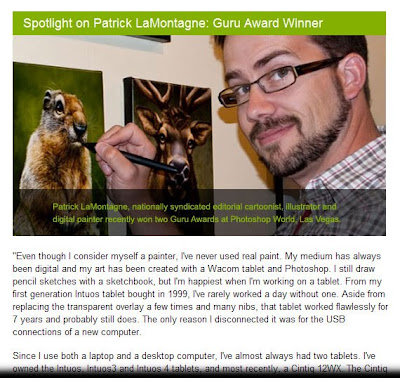
The February Wacom eNews is out, and I’m very pleased to be featured in it. You won’t find a bigger fan of Wacom than me.

Having owned half a dozen drawing tablets over the past 12 years, I wouldn’t be able to do any of my work without one. I feel it’s important to note, I’ve only replaced tablets when new ones have come out with better features. I have never had one die on me and to my recollection, the only problem I’ve ever had is that a pen started acting up on me a couple of years ago, and Wacom replaced it right away, no questions asked.

I remember doing a painting demo at a gallery last year, and explaining to a parent why a Wacom was such a good investment for his daughter who was showing some real artistic talent. While I let her try out the tablet, I was telling him how inexpensive the entry level Bamboo tablets are, how they had a lot of the same great features as the Intuos4, and even told him where he could buy one.

He asked me if I worked for them.

Posted on Leave a comment

iPad Painting: Billy Connolly


With my heavy workload lately, almost everything I’ve been doing has been for a deadline. Even the animal paintings have now become one more item on my ‘to-do’ list. It has begun to wear a little thin, so I wanted to work on something this week that was just for fun.

I’m really enjoying working on the iPad, and despite the fact that some people lament that it’s not pressure sensitive like a Wacom tablet, the drawing apps available are incredibly versatile. I haven’t painted any people in awhile, and I’ve been itching to get back at that, if for nothing else, than to improve those skills. Billy Connolly is on a growing list of people I’ve always wanted to paint, so he was as good a subject as any.

A few years ago, I read his biography, entitled ‘Billy,’ written by his wife Pamela Stephenson. I was already a fan of his comedy, but I’ve grown to become a fan of him personally as well. ‘The Big Yin’ is such a talented musician and actor, a brilliant comedian, and a dangerously intelligent man.

At one point, I had intended to do a full painting of him, and someday I still might. But for now, this was just an exercise to take drawing on the iPad a little further than just drawing a cartoon character. With the Targus stylus I recently acquired, I felt I could finally do some painting on the device.

I could have done this in colour, but I thought for this first go ’round, I’d stick with black and white. While I didn’t keep track of the time, as I worked on this off and on over the course of a week in the evenings, I would estimate that it took about four or five hours, working on the ArtStudio app. Somebody recently asked me on Facebook if I preferred this one over the Sketchbook Pro app. Having used both, I do prefer ArtStudio to Sketchbook Pro, even though the latter is still a very fine app to work with. I just find the tools in ArtStudio easier to use, and there are more of them.

It’s doubtful that I’ll ever do finished work on the iPad, because the resolution capability of the app doesn’t allow for extreme detail, but I will definitely keep stretching, to see how far I can take it. This is undoubtedly the first of many paintings I’ll experiment with on the iPad.

Posted on 5 Comments

iPad Cartooning: An Ongoing Experiment


Having done some finger painting on the iPad, I thought I’d be happy just continuing to do that. I was getting pretty decent results, having a fair bit of fun, and didn’t feel I was really lacking in any tools that would allow me to create the images I wanted.

I had heard the Pogo Stylus was a compromise at best, and many were using it simply because they couldn’t find anything better. I bought the Dagi Stylus after reading a good review, but it ended up scratching my screen in three places on the first day so I stopped using that right away. The scratches, by the way, are not obvious. I’d have to point them out to anyone wanting to see them. No real harm done, but enough that I wouldn’t use that pen again. I’d almost given up on finding a stylus, until I started hearing really good reviews about the Targus stylus (also sold as the Griffin stylus).

Since it was less than $20, I figured I’d give it a shot. Ordered one from Best Buy, with low expectations. I’m happy to report that I LOVE this pen. It works so well on the iPad screen. The rubber tip looks like it might have the consistency of a pencil eraser, but it actually has a fair bit of give, slides nicely over the screen and doesn’t require a great deal of pressure to activate the drawing apps.

You’ll notice that I’m wearing a glove on my drawing hand. While you can buy pre-fab gloves for this sort of screen work that look nice and pretty, I just bought a pair of glove liners from a local sports store. I cut the thumb, index, and middle fingers from the gloves, so that I can still use my fingers to activate the app features, such as tool presets, zooming, panning, etc. But by keeping the last two fingers on the glove, I can rest my hand on the screen while drawing, without the heel of my hand activating anything on the app. Works very well and as an added bonus, it cleans the screen as you draw.

It should be noted that I do NOT have a screen protector. I tried a couple when I first got my iPad and hated them. The installation was incredibly frustrating, and once I did get one applied well, I didn’t like how it made my images look or the feel of the screen so I removed it many months ago. It is my understanding that a screen protector will seriously decrease the effectiveness of some of these stylus pens, so be warned that if you have one on your iPad, your experience may not be as good as mine.

I do have the Apple case on my iPad at all times, and those three little scratches on the screen made by the Dagi stylus are the only ones I’ve ever had. Since I use the iPad every day, and have been using the Targus stylus quite a bit as well, I’m not worried about getting any more scratches at all, so I won’t replace the screen protector.

The app I used for this cartoon is ArtStudio. I also use Sketchbook Pro and like them both. While I will still do some finger painting for large brush painting, and less precise work, I am definitely going to continue to keep using the Targus as it’s a great addition to my iPad workflow.

Posted on Leave a comment

Thank you for continuing to hold…


Lately, I’ve been working on my training DVD for PhotoshopCAFE, entitled Cartoon Illustration Techniques in Photoshop. It has been a steep learning curve with regard to the audio and video software and hardware. Even though I had an animated editorial cartoon for about five months a few years back, this has proven to require a very different set of skills.

I’ve had a number of false starts and have had to rewrite session scripts when I realized that I had forgotten to talk about crucial steps. I’ve also had more than a few sleepless nights trying to make sure that everything I talk about is going to be coherent.

Worst of all, fitting this very large project into my already heavy workload has been challenging and this has taken far longer than I had intended it to. But, I can finally see the light at the end of the tunnel, and thankfully, it doesn’t appear to be a train. As in all things new and difficult, I’ve no doubt that I’ll come out the other side better for the experience with another set of skills to add to my repertoire. I’ll also be in need of a little time off.

So for those who’ve been asking when the DVD will be done, I plan to be able to make that announcement very soon, and thanks for your patience.